Unlock Team Productivity: Google Docs for Seamless Collaboration
In today's fast-paced digital landscape, effective team collaboration is not just a luxury; it's a necessity for survival and growth. From small startups to large enterprises, the ability to work together seamlessly, irrespective of location or time zone, directly impacts productivity and innovation. Enter the **Google Docs App** – a powerful, cloud-based word processor designed from the ground up to revolutionize how teams create, edit, and collaborate on documents. Far more than just a writing tool, it's an ecosystem that fosters real-time interaction, streamlines workflows, and ensures every team member is on the same page, literally and figuratively.
Gone are the days of endless email attachments, confusing version control, and the frustration of incompatible file formats. The Google Docs App empowers teams to overcome these challenges, offering an intuitive and integrated solution that keeps projects moving forward. Whether you're drafting a critical business proposal, a compelling marketing brief, or simply brainstorming ideas for your next big initiative, Google Docs provides the platform for efficient, friction-free teamwork across all devices.
The Power of Real-Time Collaboration, Anywhere, Anytime
At the heart of the **Google Docs App** lies its unparalleled ability to facilitate real-time collaboration. This isn't just about sharing a document; it's about dynamic, simultaneous co-creation that transforms how teams work together.
Seamless Co-creation and Feedback Loops
Imagine multiple team members, located in different cities or even continents, simultaneously editing the same document. With the Google Docs App, this isn't a futuristic concept; it's an everyday reality. You can watch as colleagues type, see their cursors moving, and instantly react to changes. This level of immediate feedback drastically cuts down on communication lags and ensures everyone is contributing to the most current version of a document.
Beyond real-time editing, the app provides robust tools for feedback and accountability. Team members can easily add comments to specific sections or words, suggesting edits or asking questions without disrupting the flow of the document. Crucially, you can also assign "action items" directly within comments, tagging specific individuals who then receive notifications and are prompted to address the feedback. This clarity in task assignment eliminates ambiguity and ensures that no important detail falls through the cracks, significantly boosting team productivity.
Uninterrupted Productivity with Offline Access
The modern professional isn't confined to a desk with a stable internet connection. Ideas strike on the commute, during a flight, or in locations with unreliable Wi-Fi. The **Google Docs App** recognizes this reality by offering a robust offline mode. This feature allows you to capture spontaneous ideas, continue drafting reports, or make urgent edits even when you're completely disconnected from the internet. All changes made offline are automatically synchronized with the cloud once you reconnect, ensuring your work is always saved and up-to-date across all your devices. This seamless transition between online and offline work means productivity never has to grind to a halt, truly enabling you to get things done on the go. To delve deeper into how these features revolutionize your workflow, consider exploring our article on
Master Google Docs: Create, Edit, & Collaborate Anywhere, Anytime.
Bridging File Formats and Enhancing Workflows
In a world where different organizations and individuals often use varying software, file compatibility can be a significant hurdle. The Google Docs App stands out by eliminating this friction, making collaboration truly universal.
Universal Compatibility for Diverse Teams
One of the most valuable features of the Google Docs App is its ability to open and edit a wide variety of file types, including widely used Microsoft Word documents, directly within the application. This means you don't need to convert files, purchase additional software, or worry about formatting issues when collaborating with external partners or clients who might use different word processors. The app ensures frictionless collaboration, regardless of which application your teammates use. Furthermore, when your work is complete, you can seamlessly convert and export files into various formats, including PDF, .docx, and more, making sharing and final delivery incredibly straightforward.
Streamlined Document Management and Security
As a cloud-based tool, the Google Docs App offers unparalleled advantages in document management. Every change is automatically saved to the cloud, eliminating the fear of losing work due to a crash or power outage. This automatic saving, coupled with instant access from any device with an internet connection, makes your documents truly omnipresent.
Security and access control are paramount when dealing with sensitive information. Google Docs provides granular control over who can access your documents and what they can do. You can share documents via a simple link and then specify whether recipients can only view, comment, or edit the file. This level of control ensures that sensitive information remains secure while fostering controlled collaboration. Moreover, the integrated version history feature acts as an invaluable safety net. It meticulously records every revision, allowing you to review past changes, identify contributors, and even revert to previous versions of a document with ease. This provides immense peace of mind, especially during complex projects with multiple collaborators.
Elevating Efficiency with Smart Features and AI Integration
The Google Docs App is continuously evolving, integrating advanced features and artificial intelligence to make your work not just collaborative, but smarter and more efficient.
Leveraging Google Workspace and Advanced Tools
The power of the **Google Docs App** is significantly amplified as part of the broader Google Workspace ecosystem. This suite of productivity and collaboration tools allows teams of any size to chat, create, and collaborate seamlessly across applications like Drive, Meet, Chat, and Calendar. This integration means you can initiate a video call directly from a document, share it instantly in a chat, or organize related files in Google Drive without ever leaving your workflow.
Beyond the core functionality, Google Docs offers an intuitive no-code editor that makes formatting documents simple with options like bold, italics, bullet points, and more. The built-in Google Explore feature is a hidden gem, allowing users to search Google Drive files and the web directly from within a document, pulling in relevant information without switching tabs. Furthermore, a vast array of add-ons and integrations, from speech-to-text functionality for hands-free writing to specialized project management tools, enhance the app's versatility, customizing it to meet specific team needs.
AI-Powered Assistance for Smarter Drafting
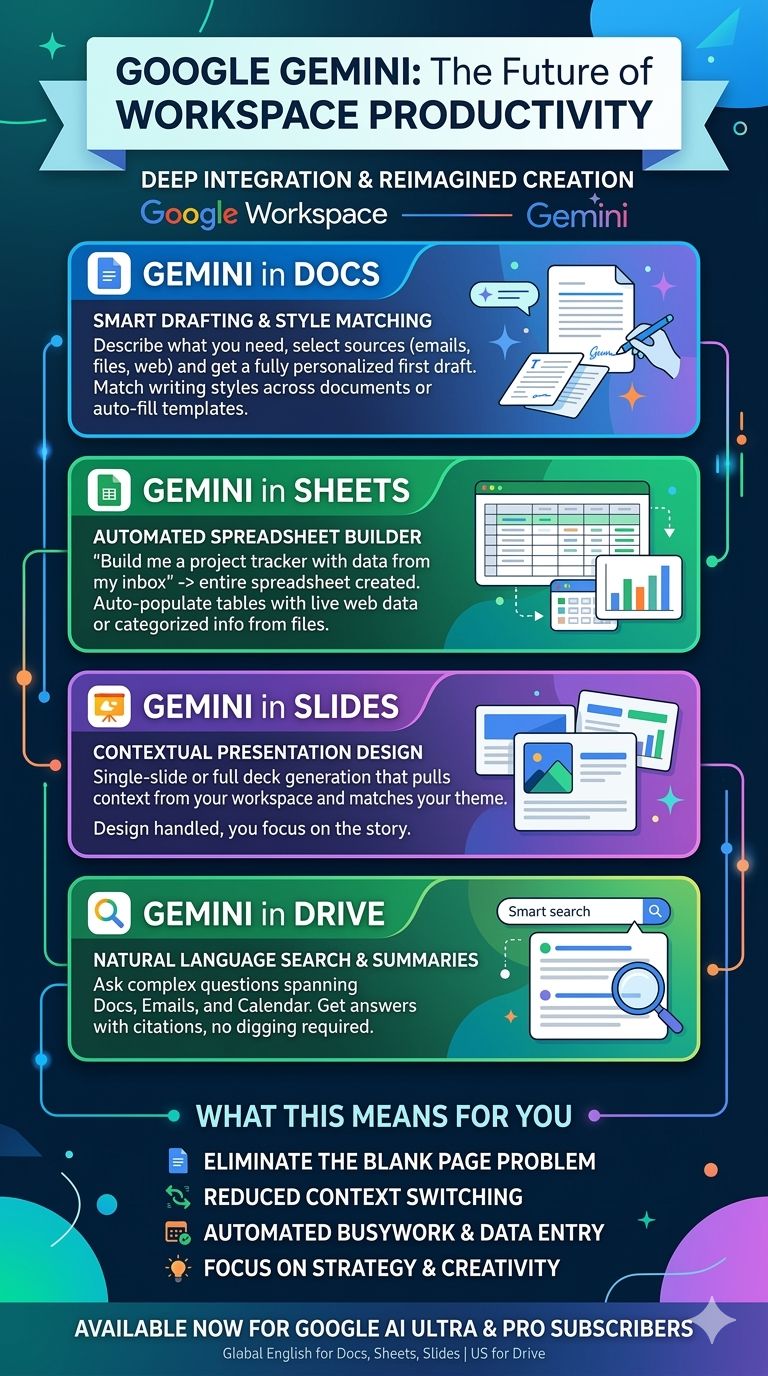
For Google Workspace paid subscribers, the Google Docs App unlocks a new dimension of productivity through advanced AI features, notably powered by Gemini. This intelligent assistance transforms the drafting and editing process, acting as a sophisticated co-writer and creative partner.
With Gemini in Docs, you can quickly draft and edit content on the go. Imagine needing to write a blog post, an executive brief, or an outline for a presentation – Gemini can generate initial drafts based on your prompts, saving significant time and overcoming writer's block. It can also help refine existing content, suggesting improvements in clarity, conciseness, and tone. Beyond text, Gemini can even create unique images to customize your documents, adding visual flair without needing external design tools. These AI-powered suggestions and content generation capabilities are designed to improve your writing, making the Google Docs App an even more indispensable tool for content creation. For a deeper dive into these cutting-edge capabilities, check out our comprehensive article:
Google Docs Features: AI Writing, Offline Editing, & File Support.
Practical Tips for Maximizing Team Productivity with Google Docs App
To truly unlock the full potential of the Google Docs App for your team, consider implementing these practical tips:
Master Comments and Suggestions
- Use @mentions: Directly tag team members in comments to notify them and assign action items. This ensures accountability.
- Resolve comments: Once a comment or suggestion has been addressed, resolve it to keep the document clean and track progress.
- Suggesting mode: Encourage collaborators to use "Suggesting" mode for edits, allowing the document owner to review and accept/reject changes individually.
Utilize Templates and Outlines
- Start with templates: Google Docs offers a variety of pre-designed templates for reports, resumes, meeting notes, and more. These save time and ensure consistent formatting.
- Create your own templates: For recurring documents, create custom templates unique to your team's needs to standardize workflows.
- Document Outline: Use headings (H1, H2, H3) to automatically generate an interactive document outline (in the sidebar), making navigation easy for long documents.
Integrate with Google Workspace
- Leverage Google Drive: Organize your Docs within specific Google Drive folders, shared with relevant team members, for easy access and robust file management.
- Connect to Google Chat/Meet: Instantly share documents in a Google Chat conversation or present them during a Google Meet call for real-time discussion and feedback.
- Link to Calendar: Include document links in Google Calendar event descriptions for meeting agendas or pre-reading materials.
Leverage Version History
- Review changes: Regularly check version history to see who made what changes and when. This is invaluable for tracking contributions and understanding document evolution.
- Restore previous versions: Don't fear making big changes; you can always revert to an older version if needed, providing a powerful undo button for your entire document history.
Optimize for Offline Use
- Enable offline access proactively: For critical documents you might need on the go, ensure you enable offline access *before* you lose your internet connection.
- Understand limitations: While offline, you can edit, but certain features requiring an internet connection (like specific add-ons or real-time co-editing) might be limited.
Conclusion
The **Google Docs App** is more than just a word processor; it's a cornerstone of modern team productivity and seamless collaboration. By enabling real-time co-creation, offering universal file compatibility, providing robust offline capabilities, and integrating intelligent AI features, it empowers teams to work smarter, faster, and with unprecedented efficiency. From capturing spontaneous ideas on a mobile device to drafting complex documents with AI assistance, Google Docs ensures your team is always connected, informed, and productive. Embrace the power of Google Docs and unlock a new era of collaborative achievement for your organization.